
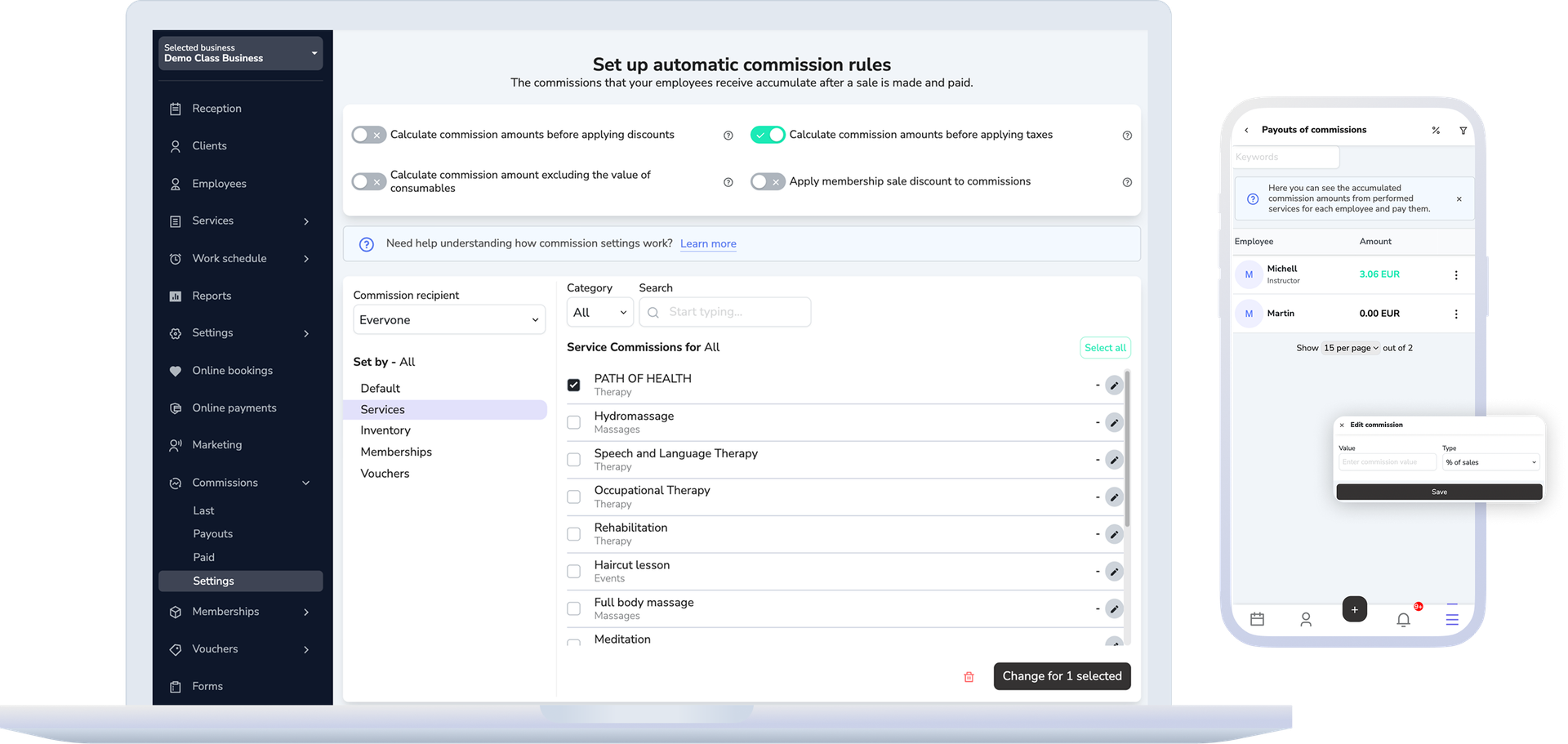
In "Settings" you pick a percentage or a fixed amount per unit, and the recipient — a specific employee or "Everyone". A rule applies to all services, products, memberships and vouchers, or to a specific item, and a label next to it shows where it comes from — set right there, the employee's general rule, or the rule for everyone.
Commissions and payouts
Commissions that are clear before payout
"Commissions" is a separate area with "Settings" for the rules and "Payouts" for accrued amounts, while the detailed lists live in "Reports → Commissions".
Why this matters
Commissions stay clear when settings, payouts, and reports are separate screens
Once the business already pays commissions, the questions come quickly: how the amount is calculated, when it accrues, what enters the next payout, and what has already been paid.
"How the commission is calculated" sums up each setting in one sentence: whether the commission is based on what the client paid or the full price, with or without VAT, with or without consumables, how a membership visit counts, and whether each employee on one service gets a commission from the whole price or from their own part. Every choice comes with a worked example in round numbers.
Commission accrues after the sale has been created and paid, not when it is first saved.
How this should work
Set the rules first, then move from accrual to payout
Settings, payouts, and reports are deliberately separate screens, so a rule changes in one place and a payout never happens by accident from the sales screen.
- You set the rules in "Settings" first — several records can be edited at once, and any rule can be reset to its default value.
- The sale is paid, and only then does the commission enter the accrued amounts — after that it does not change. New rules apply to sales paid from then on, and you can recalculate commissions already accrued with one click.
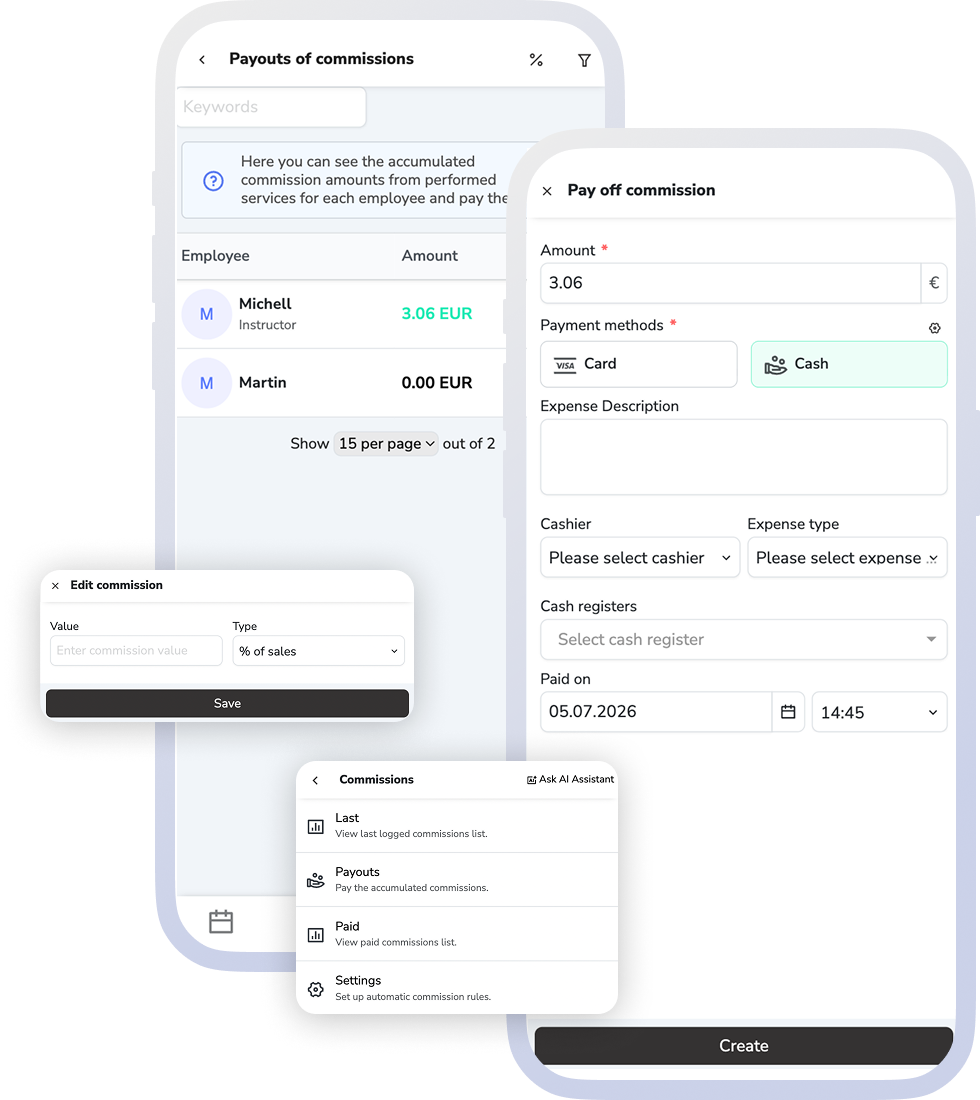
- "Payouts" lists employees with an amount due; from each employee's menu you open "Last" and "Paid", or choose to pay out.
- The payout dialog asks for the commission value and records the operation.
What this includes
The three commission screens
"Commissions" is its own area in the navigation, while the lists sit with the rest of the reports — under the names the team will see.
Settings
The rules and the amount the commission is based on: percentage or fixed amount per unit, a specific recipient or "Everyone", services, products, memberships and vouchers.
Payouts
Employees with an accrued amount, a payout dialog for entering the commission value, and quick access to "Last" and "Paid" for that employee.
Reports → Commissions
Four lists: "Last", "Paid", "Commissions by employees" and "Commissions by date". Next to the commission amount you see how it was calculated, and you can recalculate selected commissions with the current rules.
What improves
Clearer commission logic and less tension around payout
Managers can explain the logic more easily, and staff can understand what was earned, what is still waiting, and what has already been paid.
Clearer accrual logic
The team can see that commission follows the saved and paid sale, not a manual estimate or verbal rule.
A cleaner payout run
Payout starts from already accrued sums and stays separate from the rule configuration itself.
Easier review after payout
When questions come up, the business has separate latest, paid, by-employee, and by-date views instead of rebuilding the history from scattered screens.
FAQ
What teams usually ask about commissions
When do commissions accrue?
After the sale has been created and paid. A saved but unpaid sale accrues nothing — the settings screen states this explicitly.
Can we have separate rules for memberships and vouchers?
Yes. Besides services and products, rules are set by memberships and vouchers too. The commission for a membership visit is based on the visit price you set in the membership plan.
Is commission calculated before or after discounts and tax?
You decide. In "How the commission is calculated" you choose whether the commission is based on what the client paid or the full price, with or without VAT, and whether consumables are included. Every answer has an example, and next to an accrued commission you see how it was calculated.
Can one rule apply to the whole team?
Yes. The recipient is either a specific employee or "Everyone". Several selected records can be edited at once, and any rule resets to its default value.
Where do we check what has already been paid?
In "Reports → Commissions" — "Paid" keeps the history, "Last" shows the most recent accruals, and "Commissions by employees" and "Commissions by date" give the summaries.
Is this the same as payroll?
No. It covers commission rules, accrual and payout, not a full payroll system. Commissions are a paid module.
Next step
See payments, reports, or book a demo
If the next question is how the money enters the sale and payment flow, open payments. If it is how earned and paid amounts are reviewed more broadly, open reporting. If you want to map commission rules and payout control for your team, book a demo.