
Accept corporate cards per service and price option, with separate seat quotas for cards and for regular clients, so the two booking types do not compete for the same capacity.
Group activity, gym, and yoga software: schedule, memberships, and cards
Accept MultiSport, Coolfit, or Sodexo and decide how many seats go to cards and how many stay for regular clients. In the Reservation.Studio catalog people see which cards you accept and book an open spot, while your team works from the same schedule.
Good fit for Yoga studios, Pilates studios, Dance schools, Martial arts studios, Group training, and Small gyms and boutique studios

More specific solutions
Choose your studio or class model
Yoga, Pilates, and dance schools work with different schedules, capacity, memberships, and attendance. Continue with the closest activity type.
Gym and fitness studio For gyms and studios where front-desk entry, corporate cards, group classes, and memberships need to run in one system. See the solution Yoga studio For yoga studios that run recurring classes, group sessions, class passes, memberships, limited capacity, and clients who come back week after week. See the solution Pilates studio For Pilates studios where reformer and mat classes, private sessions, packs, memberships, and front desk work need to stay organized in one day. See the solution Dance studio For dance studios and schools where groups, rooms, passes, attendance, and registrations are still coordinated too much by hand. See the solution
When group sessions need more than a timetable
When the group schedule needs a system, not another spreadsheet
For group-based businesses, the pressure does not come only from the class timetable. A full session, a cancellation, an instructor change, and a membership question can all affect the same day. When bookings, passes, waitlists, attendance, and payments live in separate places, the team loses time and owners see too late where capacity and revenue are being missed.
The studio shows up in the Reservation.Studio catalog, where people search for classes by city, neighborhood, day, and time, see which cards you accept, and book an open spot.
Clients book sessions, workouts, or classes online while the team works from the same live schedule.
Capacity, spots, waitlists, and instructor changes stay in one place instead of moving through chats and spreadsheets.
Memberships, passes, packs, remaining visits, and attendance stay connected to the client and the specific session.
Owners see attendance, fill rate, capacity use, payments, and instructor workload more clearly.
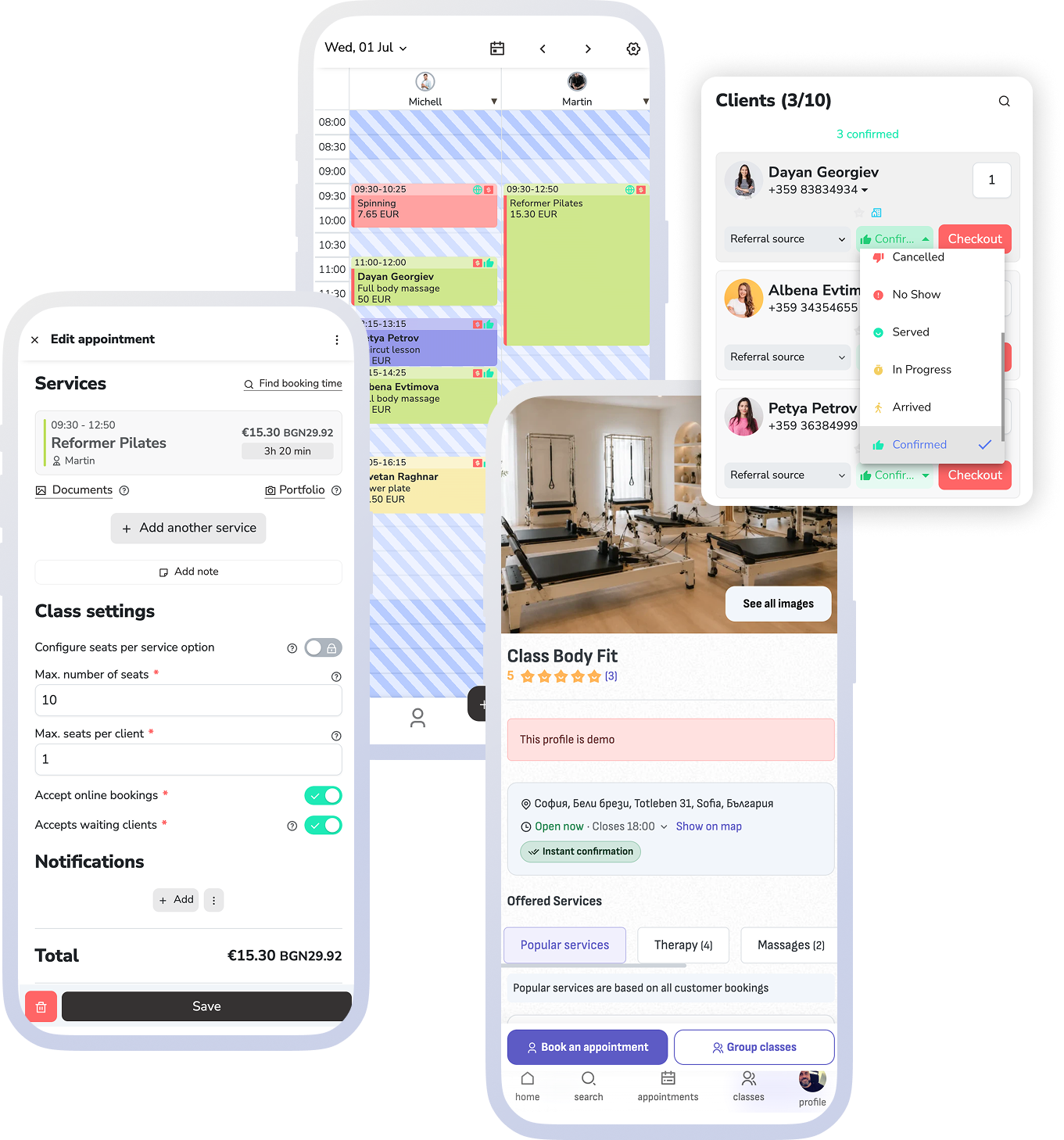
What the software should keep together
From online booking to attendance and the next visit
Reservation.Studio Business is most useful for businesses where recurring schedules, limited spots, participation rights, front desk work, and reporting need to stay in one system.
Set up sessions, workouts, or classes with duration, instructor, room or location, capacity, and online booking rules.
Let clients book through your website, widget, public profile, or shared link while staff work with the same schedule and the same spot count.
When a session is full, waitlisted clients stay visible in the same schedule and open spots are handled in booking order.
Memberships, passes, packs, remaining visits, and attendance stay tied to the client and the specific session.
For entry without a booked class — open training, a drop-in visit, time on the floor — the front desk works with check-ins: the client scans a QR code on the way in and out, and the entry fee or time spent goes onto their bill.
The day's schedule runs on a TV in the gym: connect the screen with a code and the display shows sessions, occupancy, and who is inside right now.
Payments and reports help you see attendance, fill rate, capacity use, instructor workload, and real revenue.
What improves for the studio
Fuller groups, less manual coordination, and clearer revenue visibility
The gain is not just a cleaner timetable. The team spends less time coordinating manually, clients book more easily, and owners can see which sessions, times, and memberships actually move the business.
Clients with a corporate card, paid through their employer
The catalog shows which cards you accept, and quotas decide how many seats go to cards and how many stay for regular clients.
New clients who were not searching for you by name
The public profile puts your sessions and open spots in front of people searching for pilates, yoga, or group training in their neighborhood on a specific day.
Fuller groups with less manual moving around
Capacity, waitlists, cancellations, and schedule changes stay in one system instead of being handled through chats, lists, and last-minute follow-up.
Clearer control over memberships, passes, and visits
The team can see what the client can still use, how many visits remain, and how attendance connects to the specific session.
Better visibility into attendance and capacity
Owners can see which times fill, where attendance drops, which instructors are busiest, and where capacity is not being used well.
An easier path for returning clients
Online booking, reminders, client profiles, and remaining rights help regular clients come back without asking over messages every week.
Group activities FAQ
What studios, schools, and sports teams usually ask before a demo
Does it support corporate cards like MultiSport?
Yes. For each service and price option you choose which cards you accept — MultiSport, Coolfit, Sodexo, and others. You can reserve seat quotas per option, for example how many seats go to corporate cards and how many stay for drop-ins or memberships. The team sees the same list when booking, and in the catalog clients see which cards are accepted and how many seats remain.
How do new clients find me?
The studio has a public profile in Reservation.Studio with services, opening hours, team, and open spots. People search there by city, neighborhood, day, and time and book straight into an open seat. The profile shows the same availability the team works with, so there is no separate list to maintain.
Is this only for large gyms?
No. The value starts much earlier, as soon as you run recurring group sessions, limited spots, memberships, passes, waitlists, or attendance tracking.
Can it handle limited spots and waitlists?
Yes. Group sessions can have capacity, seats per client, and waitlists, so the team does not have to keep that information in side notes or chat threads.
Does it work with entry and time spent, not just scheduled classes?
Yes. Check-ins is a separate front-desk view for gyms and studios: the client scans a QR code on the way in and out, you charge an entry fee or time spent, and the system shows who is inside right now. It works alongside the group schedule, not instead of it.
Does it support memberships, passes, and packs?
Yes. The goal is to keep client rights, remaining visits, sales, payments, and attendance tied to the client and the booking.
Does it fit yoga, pilates, dance, and martial arts businesses?
Yes. This page covers the broader class-based operating model. There are also more specific pages for yoga, pilates, and dance studios.
What usually needs to go live first?
Most teams start with services, instructors, schedules, capacity, online booking, memberships, payments, and attendance. Deeper reporting, marketing, and optimization can follow once that base is stable.
Who it is for
Most useful when schedules, capacity, and memberships already affect revenue
It gives the most to businesses with recurring group sessions, limited spots, memberships, or passes — that is where control over bookings, attendance, payments, and reports is felt right away. In the demo we show it on your own program.
You run a weekly schedule with group sessions, workouts, or classes and a limited number of spots
You accept or want to accept MultiSport, Coolfit, Sodexo, or another corporate card
You have open spots at times your regular clients rarely fill
You sell drop-ins, passes, memberships, packs, or rights tied to specific services
You handle waitlists, cancellations, no-shows, instructor changes, or multiple rooms and locations
You want clearer visibility into fill rate, attendance, revenue, and team workload
Ask for a demo
Show us how your group sessions run today
In one focused conversation, we can walk through schedules, online booking, capacity, waitlists, memberships, attendance, payments, and reporting around the way you actually work.
Free, with no obligation — during business hours we call back almost immediately. Paid plan from €13.50 a month; with up to 3 employees you start without a subscription.