
Start from the dashboard for a quick daily, weekly, or period view.
Reports and analytics
Reports that help before month-end
Track bookings, revenue, payments, clients, team activity, and active modules without making every important decision wait for month-end or another export.
Why this matters
Numbers should lead to action, not another spreadsheet
As the business grows, the questions are no longer only about tomorrow's schedule. You need to see what is selling, where bookings come from, which services and people drive results, where utilization drops, and what needs attention now.
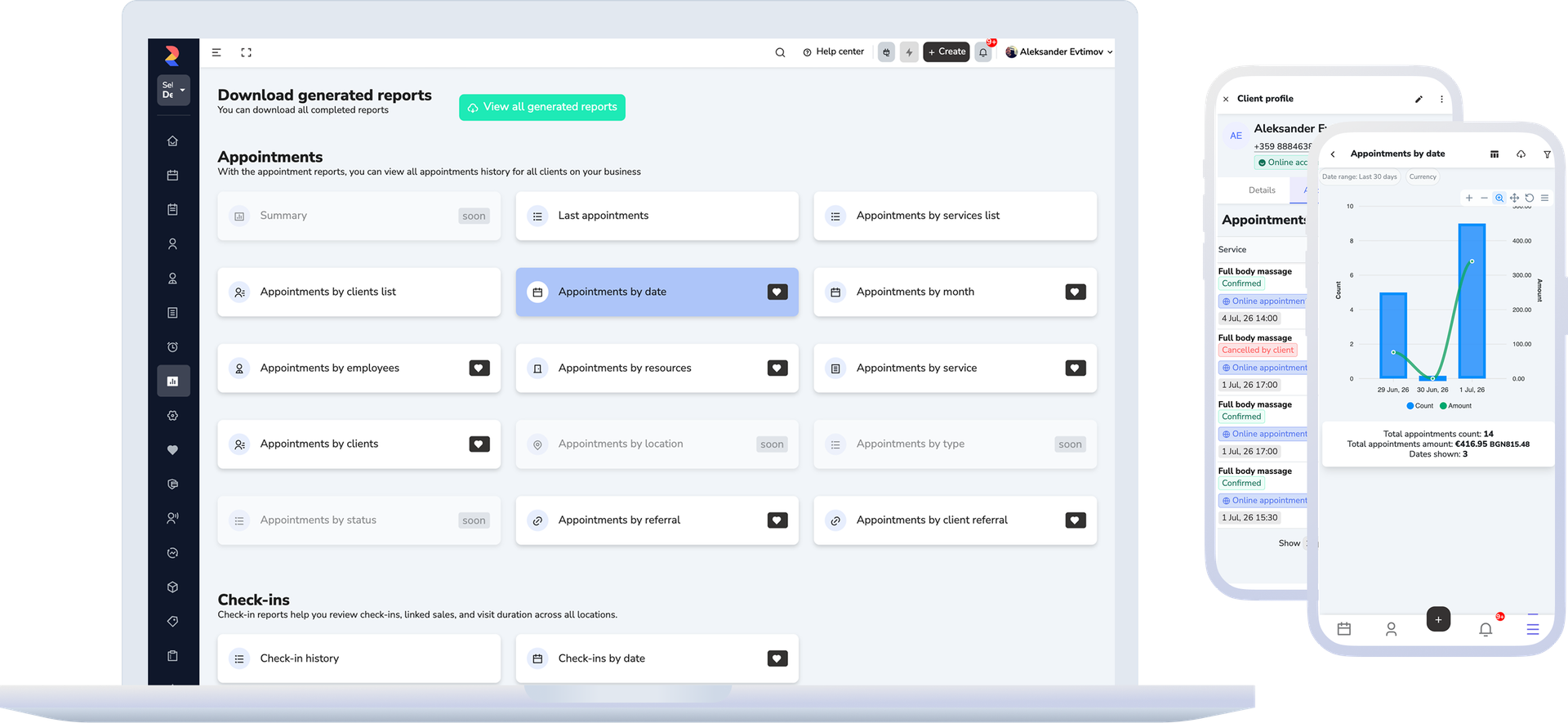
Move into the right report for bookings, payments, sales, clients, inventory, commissions, or online booking.
Export a file only when you truly need a deeper review or something to share.
How this should work
From a quick view to the right report, without managing by guesswork
Good reporting is not only a list of numbers. It should show what is happening now, where something is off, and where to look more closely.
- Start from the dashboard with key signals like upcoming bookings, payments, new clients, and installments.
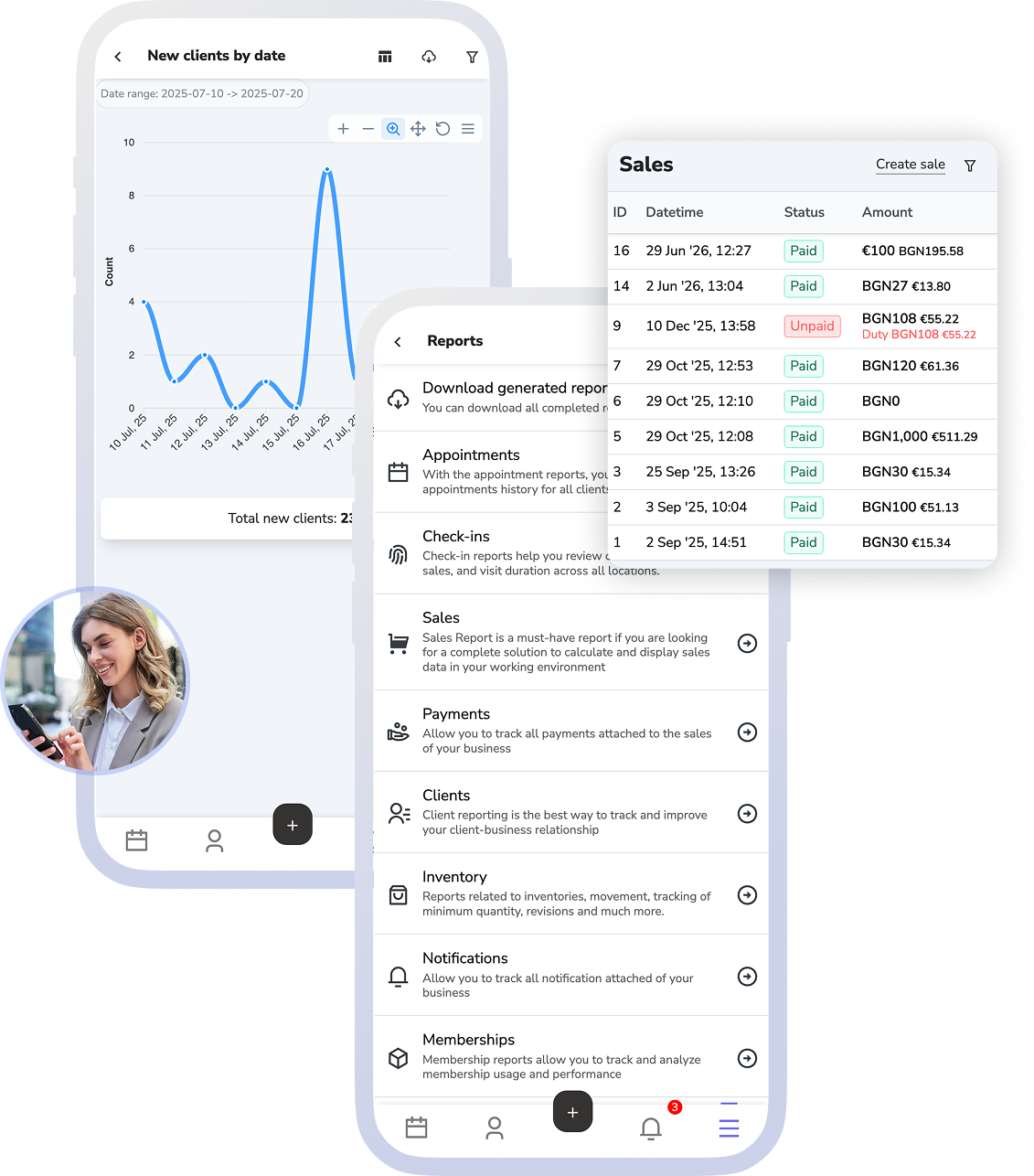
- Open the right report for the question: appointments, attendance, sales, payments, clients, vouchers, memberships, commissions, inventory, or online booking.
- Filter by period, location, team member, service, or another relevant criterion instead of hunting through one generic sheet.
- If you need a larger file, request a generated report and download it later.
What this includes
Eleven reports and one dashboard
Each part of the business has its own report, instead of everything running through one generic export.
Dashboard
The first screen with the most important numbers and signals, before you open a specific report.
Appointments, attendance, and online bookings
Separate reports for what was booked, what actually showed up, and what the public channel brings in.
Sales, payments, and commissions
The financial side in three cuts, over the same sales the commissions accrue from.
Clients, memberships, and vouchers
Who comes back, what they still have the right to use, and what value is sitting unused.
Inventory and notification reports
Stock movement and the cost of notifications sent — the two costs that otherwise get noticed late.
Per-report permissions
The owner sees all of them. For an employee, a report opens only if their role or individual permissions include that exact report — otherwise the screen names the missing permission.
What improves
Earlier decisions and less file-driven management
Owners and managers can see earlier where revenue grows, where utilization drops, and where action is needed without starting every answer from a new export.
A clearer view of revenue and activity
Bookings, payments, sales, and client activity become easier to review in one place and earlier.
Easier comparison across periods, team members, and locations
It becomes easier to see what is working better, where performance drops, and where a change is needed.
Less manual reporting work
The team goes into the platform for answers more often instead of starting from external spreadsheets.
FAQ
What teams usually ask about reporting
Is this only a dashboard with a few numbers?
No. The dashboard is only the starting point. From there you can move into the right reports for bookings, sales, payments, clients, vouchers, memberships, commissions, inventory, or online booking.
Do I always need an export to understand what is happening?
No. The goal is to see the important numbers inside the platform first. A file is generated only when you truly need a larger review or something to share.
Can I compare periods, locations, and team members?
Yes. The reports use filters and grouping so you can review different periods, locations, services, or people more clearly.
Are all reports available for every business?
No. The core reports are the base picture. More specialised groups such as inventory, memberships, or commissions depend on the active modules, and some deeper analytical views are part of Reports PRO.
Is this accounting software?
No. This page is about the business’s own reports: bookings, payments, clients, team, sales, and active modules.
Next step
See payments, inventory, or book a demo
If the next question is how sales and payments are formed, open payments. If you want the connection between stock, sales, and reporting, open inventory. If you want to see what dashboards and reporting would look like for your business, book a demo.