
Clients receive confirmations, reminders, and booking updates at the right moment instead of the team catching up manually.
Notifications, reminders, and messaging
Reminders and notifications that do not depend on team memory
Send confirmations, reminders, booking updates, and internal notifications without someone typing messages by hand for every appointment.
Why this matters
Messages around the appointment keep the day on track
When clients do not get timely confirmations, reminders, or important updates, the pressure reaches the front desk. This part keeps booking communication organized instead of spreading it across copied texts, side chats, and personal habits.
Staff see important notifications when a booking, change, or another signal needs action.
Templates, channels, languages, and sending timing are managed centrally instead of each person sending different messages by habit.
How this should work
From booking creation to reminders, updates, and team response
The most useful setup keeps confirmations, reminders, and booking-related notifications inside one shared logic. Clients know what comes next, and the team spends less time explaining, chasing, and correcting missed communication.
- Set which message types go to clients and staff and through which channels: email, SMS, or push in the mobile app.
- Manage templates, languages, and timing centrally so confirmations and reminders stay consistent.
- Keep one-off messages and reminders around a specific booking inside the same communication model instead of rewriting them every time.
- Keep online-booking messages and marketing campaigns separate from the messages that support the appointment itself.
What this includes
The notification screens and what runs on its own
This is where the messages around the appointment itself are managed — marketing campaigns are a separate topic on a separate screen.
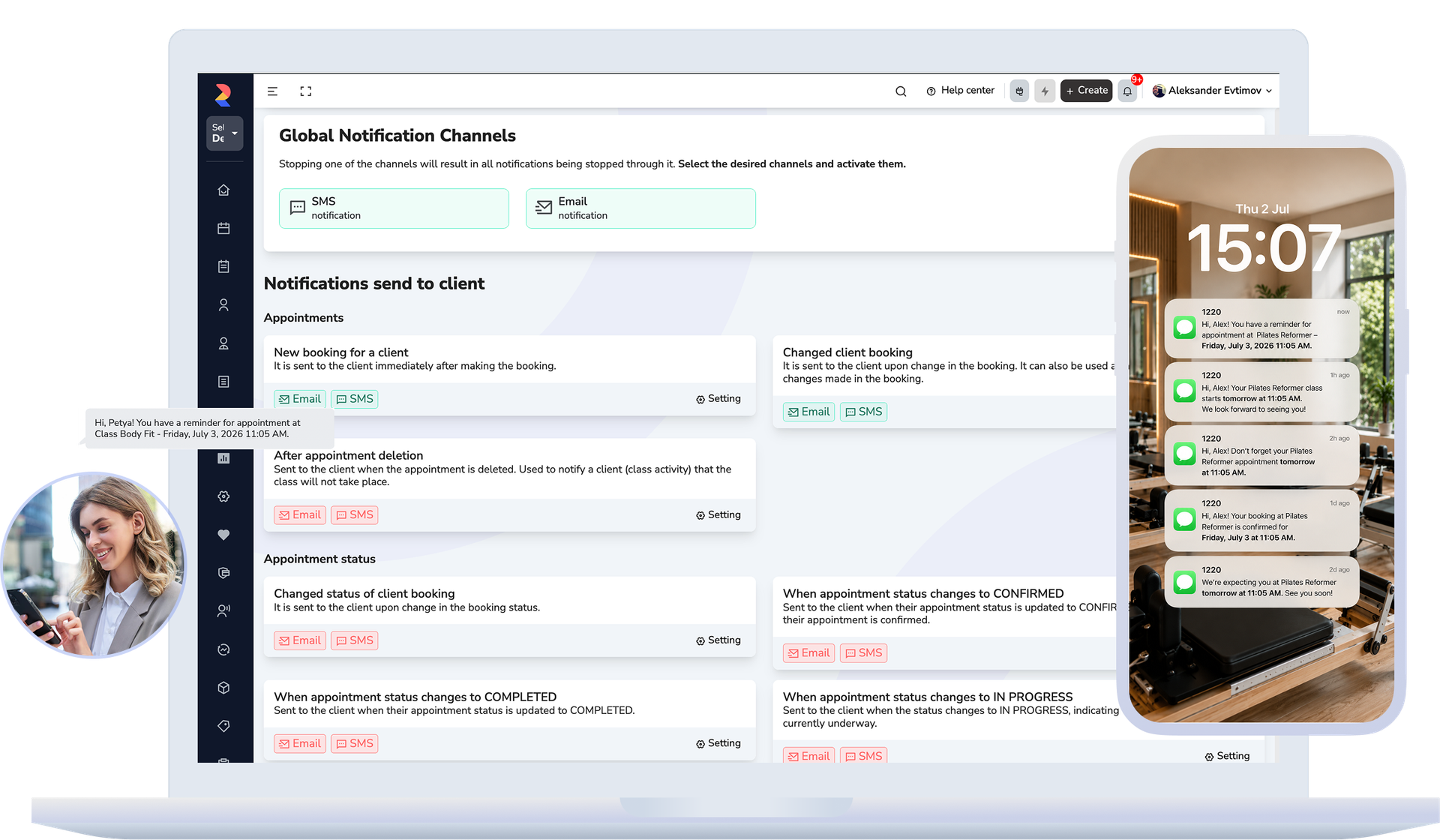
Channels
Email, SMS and push in the mobile app are switched on or off globally for the whole business. This is where you decide which channel is used at all.
Templates
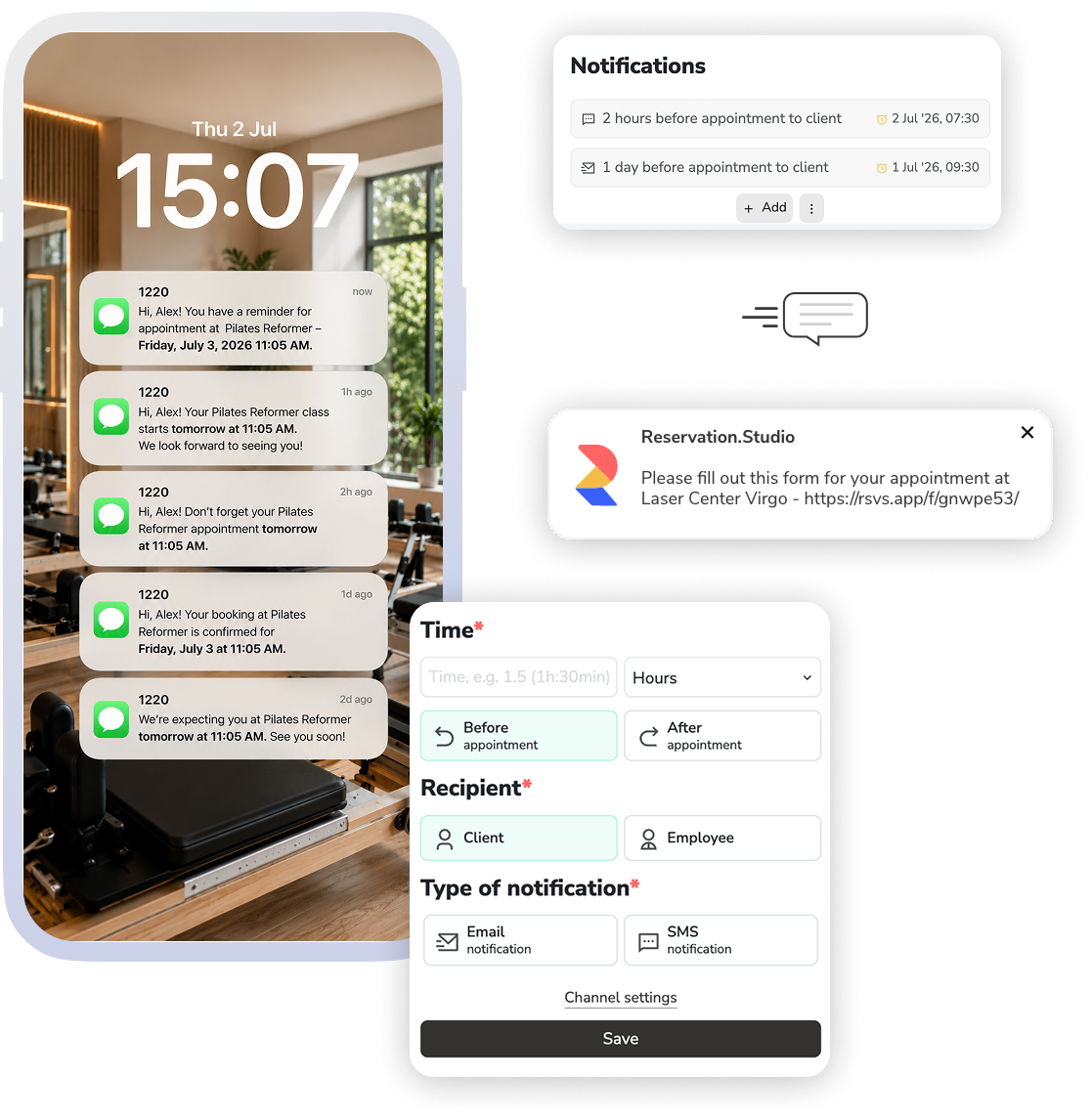
Each notification type is configured by recipient, channel and language, plus the settings specific to that type. Confirmations, reminders and change notices stop depending on who writes them.
Prices
Prices per channel, prices per country and volume discounts — the cost of notifications is visible up front, not a surprise on the invoice.
What runs on its own
The reminder before and after the visit, the birthday greeting at the hour you set, the installment reminder before its due date, and the online payment link all go out automatically from your settings. The appointment email also carries a calendar invite that puts the visit straight into the client's calendar.
What improves
Less confusion and less manual reminder work
The team knows what is sent and when, clients receive more consistent messages, and the business spends less time catching up on missed follow-up.
Fewer missed confirmations and no-shows
Reminders and important messages reach the client more consistently and at the right time.
Less manual messaging from the team
Front desk and staff rely less on copied text, side chats, and personally reminding every client.
Clearer control over communication
Templates, languages, channels, and message volume are easier to manage once they live in one place.
FAQ
What teams usually ask about notifications
Which channels reach the client?
Email, SMS, and push notifications in the mobile app. Which channels are active for each message type is configured centrally, not per appointment.
Is this the same as marketing campaigns?
No. This page is about the messages around the appointment itself: confirmations, reminders, updates, and team notifications. Campaigns and promotional communication are a separate part of the system.
Is this the same as online-booking messages for a specific public profile?
No. The texts and messages clients see while booking online belong to online booking. This page covers the shared logic for confirmations, reminders, and notifications around the appointment.
Which messages go out on their own, without the team doing anything?
The confirmation and reminders around the visit, the birthday greeting at a set hour, the installment reminder before its due date, and the online payment link are all sent automatically from the template settings. The team only writes the one-off messages it chooses to send.
Can different message types use different templates, languages, and timing?
Yes. That is one of the main reasons to manage notifications centrally instead of sending the same message for everything.
Can the team also send one-off messages around a specific booking?
Yes. One-off messages and reminders around a specific appointment can stay close to the booking without breaking the wider communication logic.
Can we manage channels centrally and see messaging cost?
Yes. Channels can be managed centrally, and at higher volume that gives the business a clearer view of what is being sent and what it costs.
Is this only useful for larger teams?
No. It becomes useful as soon as confirmations, reminders, and booking changes stop being reliable when they are handled manually.
Next step
See front desk, forms, or book a demo
If the issue is what happens around the live booking and schedule changes, open front desk. If you want to prepare clients before the visit, open forms. If you want to see how confirmations and reminders are managed more cleanly, book a demo.