
Clients can book classes, practices, or private sessions online while the team works from the same schedule and booking rules.
Yoga studio software for schedules, memberships, and repeat visits
When the schedule fills up, instructors change, and clients ask about remaining visits, a yoga studio needs more than a calendar. Reservation.Studio Business keeps weekly schedules, spots, passes, payments, and attendance in one clear system.
Good fit for Yoga studios, Boutique studios, Studios with passes and memberships, and Teams with group classes and private sessions

When a yoga studio needs more than a calendar
When the schedule can no longer be managed with a spreadsheet and messages
A simple timetable can work at the beginning. But once the studio has morning and evening classes, multiple instructors, visit passes, trial bookings, last-minute cancellations, and clients waiting for spots, manual coordination starts taking time and hiding what is really happening in the business.
Limited spots, waitlists, cancellations, and instructor changes stay visible instead of living in chats and side lists.
Passes, memberships, remaining visits, payments, and attendance stay connected to the client and the class.
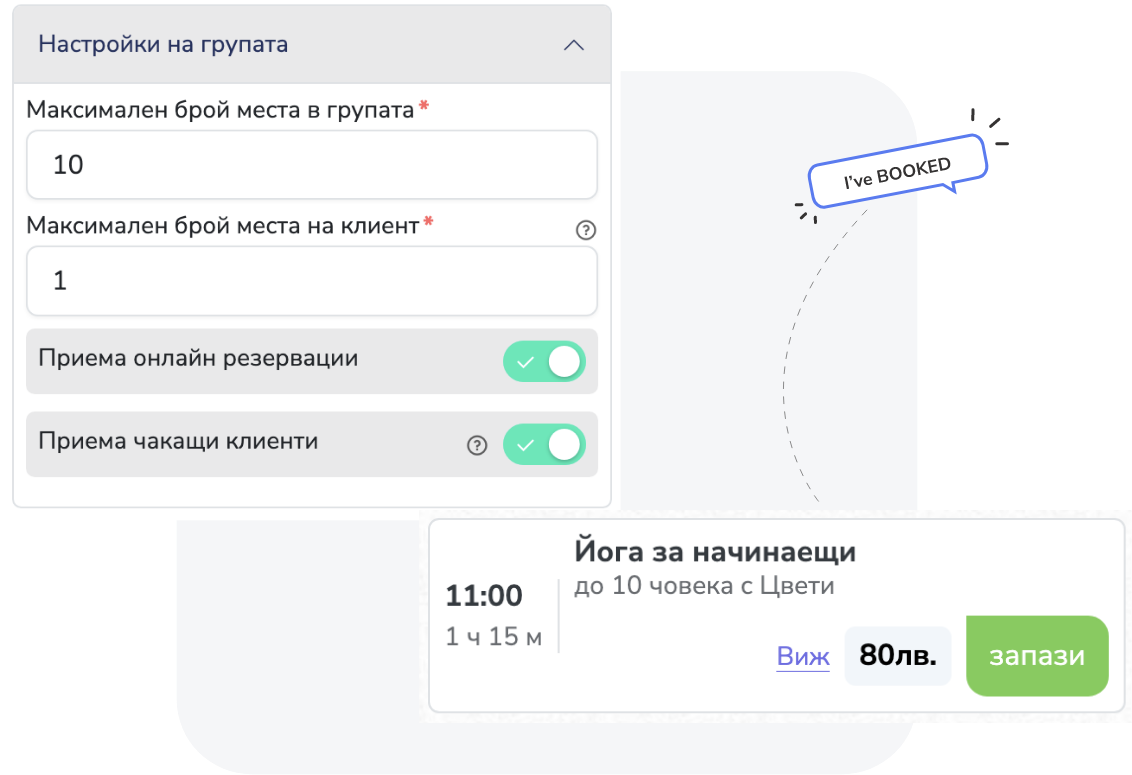
What the software keeps together
What an organized day looks like in a yoga studio
Reservation.Studio Business fits studios that want bookings, passes, attendance, payments, and reporting to work as one system, not as separate notes around the timetable.
Set up classes, private sessions, or special workshops with duration, instructor, location, capacity, and booking rules.
Clients book through your site, widget, public profile, or shared link while the team sees the same spots in the internal schedule.
When a class is full, waitlisted clients stay on the list and the team can see who is next if a spot opens in time.
Passes, memberships, drop-ins, remaining rights, and payments stay tied to the client profile.
Attendance and reporting show which classes fill up, which time slots weaken, and where the schedule or communication needs attention.
What the studio gains
Less admin work and a clearer path to repeat visits
Good software does not replace the studio atmosphere. It removes the manual work around bookings, passes, waitlists, and payments so the team can focus on classes and clients.
Easier booking without constant messages
Clients can see the schedule and request a spot online instead of every change going through phone calls, chat, or the front desk.
Better control over passes and remaining visits
The team can see what the client can still use, how many visits remain, and how payment connects to the class.
Fewer empty spots in high-demand classes
Capacity, waitlists, and cancellations are easier to manage, so full classes do not depend on last-minute manual reshuffling.
Clearer visibility into the schedule
Owners can see which classes keep people coming back, which times are weakening, and how capacity is used through the week.
Yoga studio FAQ
What owners usually want clarified before a demo
Is this a fit for a small yoga studio?
Yes. With up to 3 employees you start without a subscription, and the paid plan for one instructor with online booking starts at €13.50 a month. The value starts as soon as the studio has a recurring schedule, class passes, limited spots, or clients who need an easier way to book.
Can it support group classes and private sessions?
Yes. You can organize different service types: group classes with capacity, private sessions, trial visits, or special workshops with their own rules.
How do passes and memberships work?
You can sell plans with validity, included services, and visit counts. After the sale, the team can see the issued membership, remaining visits, and usage.
Can a full class have a waitlist?
Yes. Group sessions can have capacity and accept waitlisted clients, so this does not have to live in a separate list.
What usually needs to go live first?
Most studios start with schedule, services, instructors, capacity, online booking, passes, memberships, payments, and attendance. Reporting, marketing, and finer rules come after that base is stable.
Who it is for
Most useful when schedules, passes, and bookings already affect revenue
It gives the most to studios with recurring classes, limited spots, passes, or memberships — that is where control over bookings, attendance, and payments is felt right away. In the demo we show it on your own schedule.
You run a weekly schedule with group classes, different instructors, or several class types
You sell class passes, memberships, drop-ins, trial visits, or packages
You handle limited spots, waitlists, cancellations, no-shows, or last-minute changes
You need clearer visibility into fill rate, attendance, revenue, and active clients
Ask for a demo
Show us how you manage schedules, passes, and bookings today
In a yoga studio demo, we can walk through weekly schedules, online booking, capacity, waitlists, passes, memberships, attendance, payments, and reporting.
Free, with no obligation — during business hours we call back almost immediately. Paid plan from €13.50 a month; with up to 3 employees you start without a subscription.