
The schedule runs by dentist and room at the same time, so chairs never double-book and every dentist's day is clear.
Dental practice software: schedule by dentist, patients, and payments
Reservation.Studio Business keeps the schedule by dentist and room, patient history, consents, reminders, and payments in one system. Patients book online or through the front desk, and the practice sees the whole day — which dentist, which room, which patient, and what comes next.
A good fit for Dental practices and offices, Practices with several dentists and rooms, and Dental centers with a front desk

When the front desk stops keeping up
When the practice needs a system, not a notebook at the front desk
A dental practice loses the most to no-shows and scattered information: the appointment is in a notebook, the photos are on a phone, the consent is in a folder, and the installment plan is memorized. Once there is more than one dentist or room, overlaps and front-desk questions grow faster than the patient list.
The patient's history — visits, notes, photos, and documents — lives in the patient record, ready at the next visit.
Consents and questionnaires are filled in before the visit, not in the chair during the first ten minutes.
The reminder before the visit goes out automatically, and a cancelled slot can be filled from the waitlist.
Treatment can be paid at once or in installments, with a reminder before each due date and a clear balance per patient.
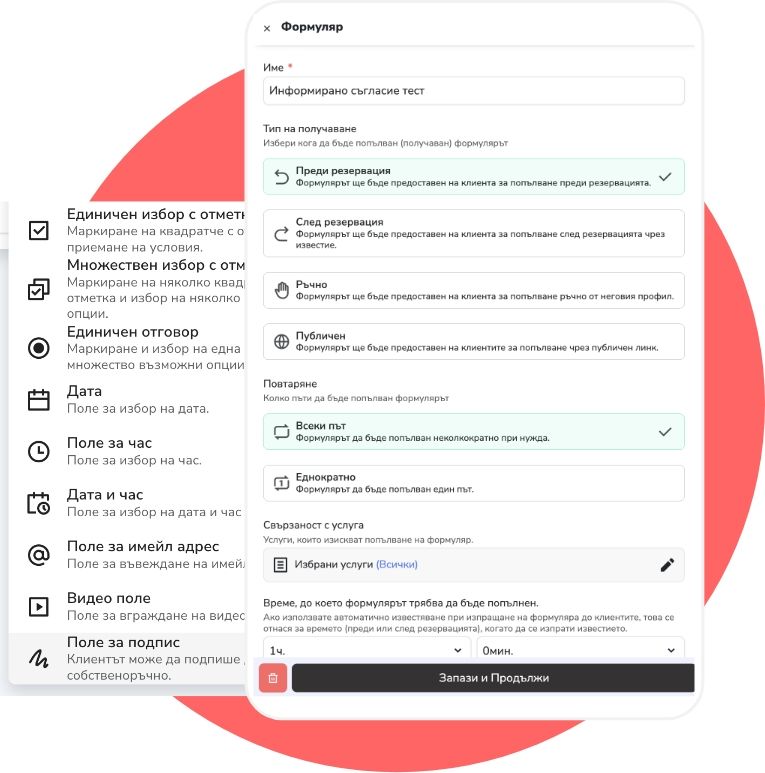
What the software holds together
What an organized day looks like in a dental practice
Reservation.Studio Business keeps bookings, patient history, consents, reminders, and payments in one system, so the front desk and the dentists work from the same schedule.
Set up services by dentist and room — exams, treatment, prophylaxis — with realistic durations, so chairs never overlap.
Patients book through the front desk or online — from your website, the Reservation.Studio catalog, or a shared link — only for the services you open for online booking.
Before the visit the patient gets a reminder and fills in the consent or questionnaire from their phone, and the front desk sees who is ready.
Notes, photos, and documents stay attached to the visit — what was done, what comes next, and what was agreed.
Payment closes at once or in installments, with an automatic reminder before each due date and a clear balance per patient.
Reports show load by dentist and room, no-shows, and which patients are due for a follow-up.
What improves
Fewer no-shows, better-prepared visits, and clear balances
The benefit is not just a tidier calendar. Reminders keep the chair busy, consents arrive filled in, and payments and installments stop being memorized.
No-shows drop noticeably
The automatic reminder before the visit and easy rescheduling keep the chair busy instead of empty at the last minute.
The visit starts prepared
The consent and questionnaire are filled in ahead of time, the history is in the patient record, and the dentist sees what was done and what comes next.
Installments track themselves
The installment plan stays on the sale, the reminder goes out before the due date, and the balance per patient is visible in a second.
The practice shows up in numbers
Load by dentist and room, no-shows, revenue by service — the owner sees what actually happens, not what is assumed.
Dental practice questions
What practices usually want clarified before a demo
Can the schedule run by dentist and room at the same time?
Yes. A service is tied to both the dentist and the room, so a booking takes both. Chairs cannot double-book, and each dentist's and each room's day is visible separately.
How does it help against no-shows?
The patient gets an automatic reminder before the visit by email, SMS, or push. Rescheduling moves the appointment inside the same schedule, and the freed slot can be offered to a waitlisted patient. The exact effect depends on the practice — you see it in the no-show report.
Can the consent be filled in before the visit?
Yes. The form — consent, medical history, or questionnaire — is sent to the patient and filled in from their phone before the visit. The completed document stays in the patient record.
Does it support installment payment plans?
Yes. A sale can be split into installments with due dates, the installment reminder goes out automatically before each date, and the patient's balance is always visible.
What stays in the patient's history?
Visits, notes, photos, and documents for each appointment, plus payments and open balances. At the next visit the dentist sees what was done and what was agreed.
Is it a fit for a small one-dentist office?
Yes. With up to 3 employees you start without a subscription, and the paid plan for one dentist with online booking starts at €13.50 a month. The value shows up as soon as reminders and history stop being run by hand.
What usually needs to start first?
The base is usually services, dentists, rooms, the schedule, and reminders. Forms, installments, and reports come once the base is running.
Who this is for
Most useful when the schedule by dentists and rooms already defines the day
For practices with more than one dentist or room, where no-shows, consents, and installment payments already cost time and revenue.
Practices with two or more dentists or more than one room
Practices where no-shows are a visible cost
Practices offering treatment plans paid in installments
Front desks still working with a notebook and a phone
Ask for a demo
Show us how your patients book today
In one conversation we walk through the schedule by dentist and room, reminders, consents, and payments — on a sample dental schedule.
Free, with no obligation — during business hours we call back almost immediately. Paid plan from €13.50 a month; with up to 3 employees you start without a subscription.