
A new beginner group, a full class, or a teacher change can quickly rearrange the weekly schedule.
Dance studio software for schedules, passes, and attendance
A dance studio is rarely just one calendar. There are age groups, levels, dance styles, teachers, rooms, class passes, trial bookings, and last-minute changes. Reservation.Studio Business keeps all of that in one system.
Good fit for Dance studios, Dance schools, Kids and adult groups, and Studios with class passes

When the schedule is no longer enough
When a dance studio needs more than a timetable spreadsheet
In real operations, one dance school may manage kids groups, adults, beginners, advanced groups, private lessons, class passes, and room rental at the same time. When every change goes through a message, a note, or a separate spreadsheet, the team starts losing time and clarity.
Class passes, drop-ins, trial bookings, and attendance often get tracked in separate lists.
When registration happens through calls and messages, it becomes hard to see who has a spot, who is waiting, and which groups are really filling.
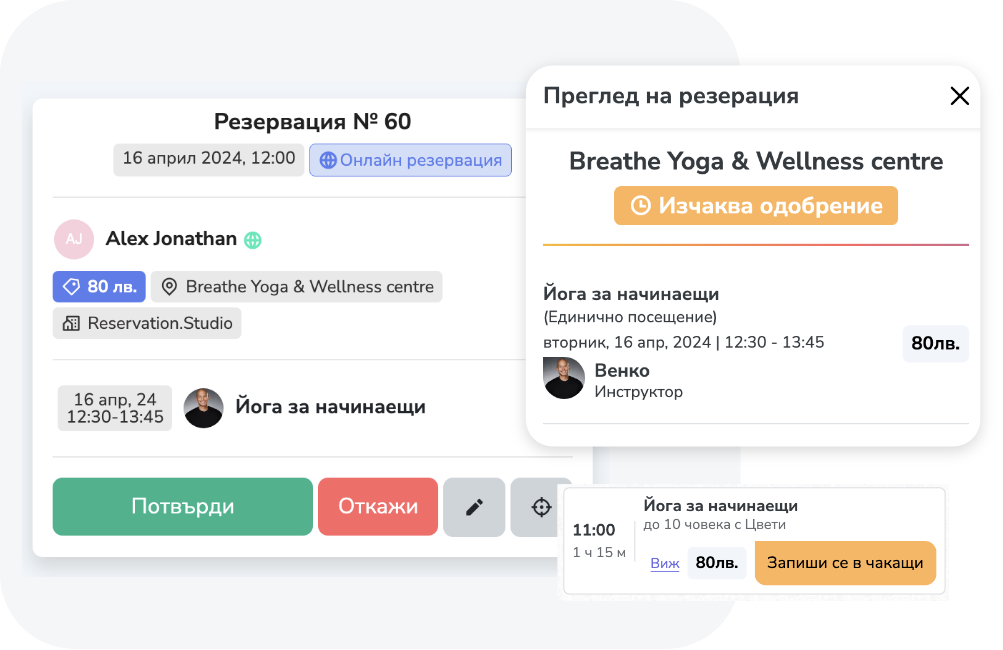
What the software holds together
What organized dance-studio operations look like
Reservation.Studio Business fits best when the studio wants schedules, people, rooms, passes, attendance, and client history to work together instead of as separate lists.
Organize the weekly program by style, level, age group, teacher, room, and capacity.
Track passes, packages, drop-ins, and attendance by the actual groups, not in a separate list.
Give students or parents a clearer path to register, ask about an open spot, or book a trial instead of moving everything through messages.
See which groups are filling, which time slots stay weak, and where a new group, change, or better communication is needed.
What improves
What changes when the studio works from one system
The right system does more than display a schedule. It helps manage the full class cycle: registration, available spots, pass usage, attendance, changes, and the next action.
Clearer schedules by groups, levels, and rooms
The team sees the program the way the studio actually runs: time, teacher, group, level, room, and capacity.
Less manual tracking of passes and attendance
Class passes, packages, drop-ins, and attendance do not stay in a separate spreadsheet or in the administrator's memory.
Better visibility into which groups are growing
Owners see earlier which classes are filling, where people are waiting, and where the schedule is not using capacity well.
Dance studio FAQ
What owners usually want to clarify before a demo
Is this suitable for a small dance studio?
Yes. With up to 3 employees you start without a subscription, and the paid plan for one instructor with online booking starts at €13.50 a month. The value starts as soon as the studio has a recurring schedule, class passes, level-based groups, or needs a clearer way to handle registrations.
Can it work for kids and adult groups?
Yes. You can organize services, groups, teachers, rooms, and capacity around the way the studio operates: kids, adults, beginners, advanced students, or different dance styles.
What usually has to go live first?
Most studios start with the weekly schedule, teachers, rooms, capacity, class passes, and how students sign up.
Does this replace communication with students or parents?
No. The goal is to make communication clearer by grounding it in better data: who is registered, who has an active pass, who attended, and where there is an open spot.
Who it is for
Dance studios and schools that keep groups, passes, and registrations in one system
A focused conversation is most useful when the dance studio already has recurring schedules, different groups, class passes, or several people coordinating registrations.
Studios with groups by age, style, or level: beginners, advanced students, kids, adults
Schools with 4, 8, 12, or larger visit passes, drop-ins, and trial bookings
Teams that need clearer visibility into capacity, attendance, waitlists, and teacher workload
Ask for a demo
Show us how you manage schedules, groups, and passes today
In a dance studio demo, we can walk through weekly schedules, level-based groups, room capacity, class passes, attendance, and online registration.
Free, with no obligation — during business hours we call back almost immediately. Paid plan from €13.50 a month; with up to 3 employees you start without a subscription.